Introducing Watchlist
Track the stocks and sectors you care about, see price moves at a glance, and get a feed tailored to your list.
Insighthread team
Today we're introducing Watchlist: one place to follow the stocks and sectors you care about.
Build a list, see how every name is moving at a glance, and get a feed tailored to what you actually own or watch.
What's new
- Lists for everything. Keep as many watchlists as you like — "AI related", "Defense", "Pharma" — or view All Watchlists at once, grouped by list.
- Returns for any timeframe. Switch between 1M, 3M, 6M, YTD, 5Y, 10Y and All. Returns and each row's mini chart update to match.
- Three views. A split view with index and sector context, a dense list for scanning, or cards with a price chart for each stock.
- Sort by what matters. Click Name, Price, Market Cap or Returns to reorder the list.
Compare stocks side by side
Select a few stocks and choose Graph selection to plot them on one chart. Add more with Compare graphs (press C) without leaving the view.
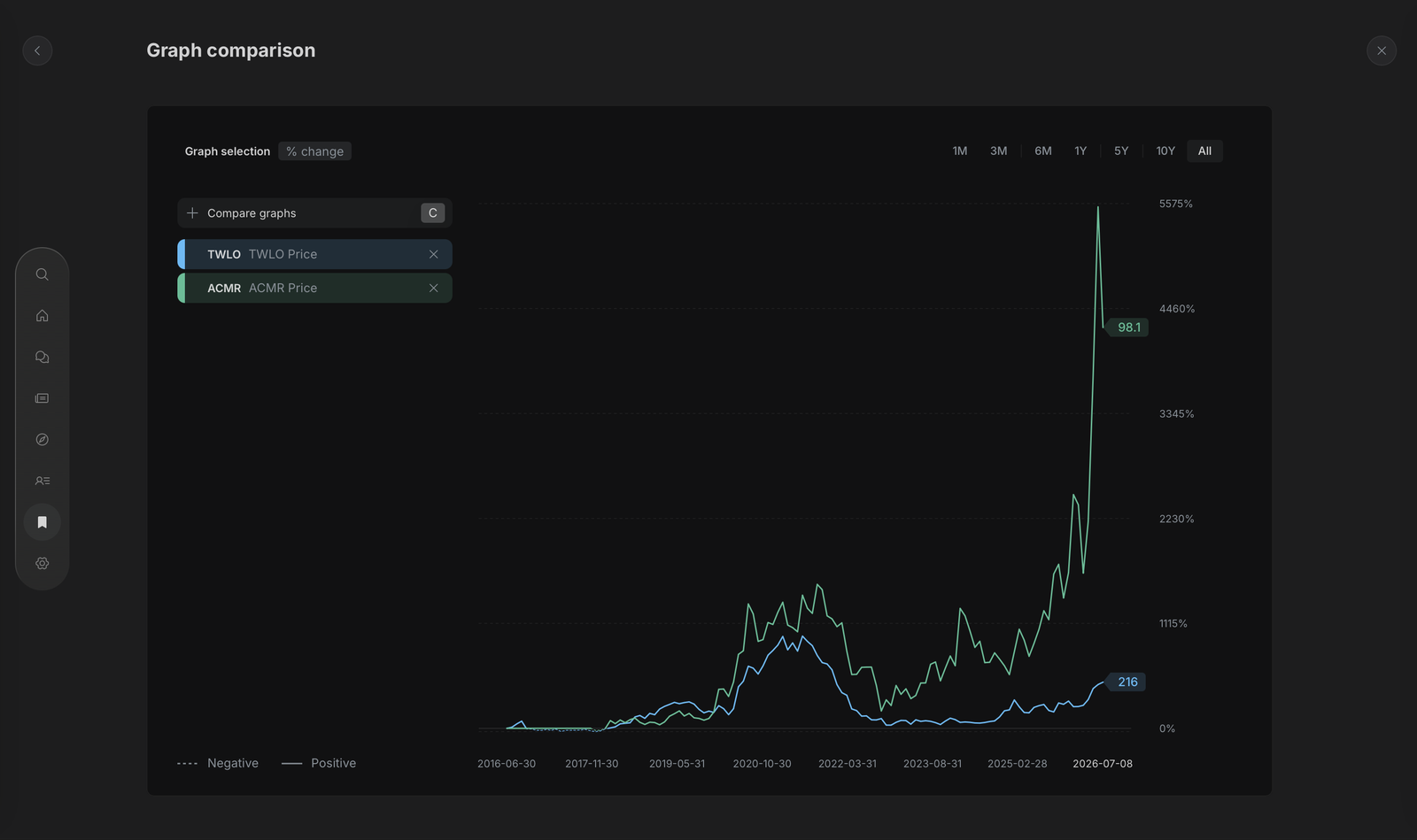 Graph comparison of TWLO and ACMR in Watchlist
Keep your lists tidy
Tick the stocks you want, then Move them to another list or Delete them in one go. The + button finds any stock or fund and adds it straight to your list.
Go deeper in one click
Click any row to open that company's full profile on top of your watchlist. Press W to close it and you're right back where you were.